
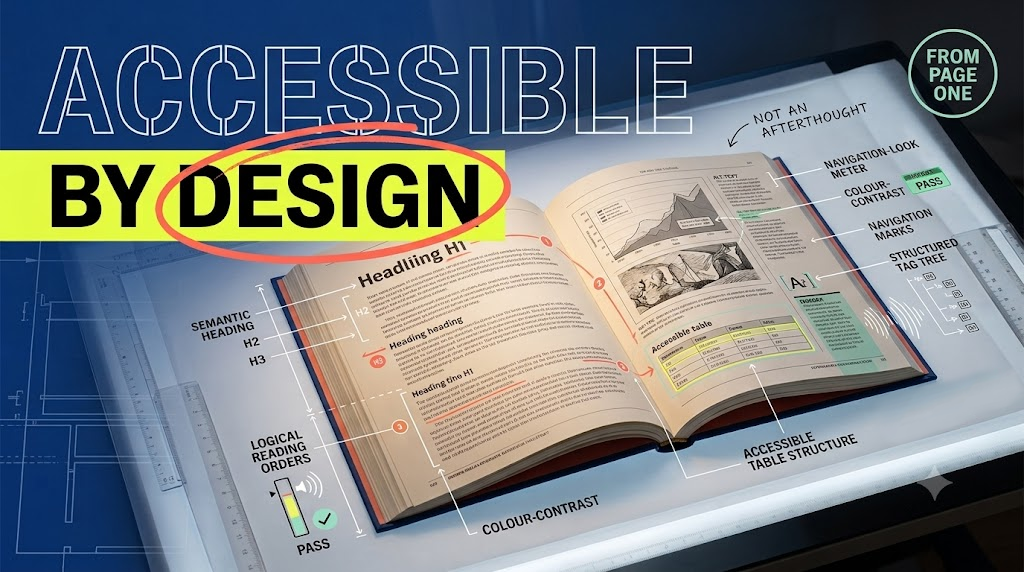
Book formatting services should build accessibility into hierarchy, typography, colour, images, navigation, reading order, and output specifications before full composition begins. This approach reduces late repair and makes EPUB, HTML, and tagged PDF more consistent. Born-accessible design does not remove creative choice; it ensures that visual decisions also carry programmatic meaning and remain usable with assistive technology.
Born-accessible book design starts with structured content, readable typography, sufficient contrast, logical order, meaningful image descriptions, accessible tables, clear navigation, and flexible presentation. These requirements are included in the design brief and sample pages, then checked throughout composition. Retrofitting them later is slower because layout, source order, metadata, and formats may all need repair.
What Does Born-Accessible Book Design Mean?
Born-accessible design means planning a book so disabled readers can perceive, navigate, understand, and operate its digital forms from the start. Editors, designers, typesetters, image specialists, and conversion teams share accessibility requirements before pages are built. The source, visual design, reading order, alternatives, metadata, and final formats are considered together.
A design can look clear and still be inaccessible. A heading may be visually large but not tagged as a heading. A two-column spread may read in the wrong order through text-to-speech. A chart may use strong colours but provide no equivalent explanation. A PDF may contain tags while their hierarchy is incorrect.
| Formatting Decision | Accessible Requirement | Production Evidence |
|---|---|---|
| Heading design | A logical hierarchy that does not depend on appearance alone | Named styles mapped to semantic headings |
| Page composition | Visual and programmatic order communicate the same sequence | Reading-order review in EPUB and tagged PDF |
| Images | Meaningful visuals have an equivalent text alternative | Approved alt text or extended descriptions linked to assets |
| Typography and colour | Readable contrast, resizing, spacing, and non-colour cues | Contrast tests and representative device checks |
Siliconchips Services provides book formatting and layout design services for publishers requiring coordinated print, digital, and accessible outputs.
Reflowable vs Fixed-Layout Accessibility
Reflowable EPUB usually provides greater flexibility because readers can resize text, change spacing, adjust colours, and use varied screen sizes. Fixed-layout EPUB preserves exact page design but makes source order, magnification, navigation, text alternatives, and device behaviour harder to manage. Format choice should follow content need, not visual preference alone.
Text-heavy fiction, non-fiction, and academic books normally suit reflowable EPUB. Illustrated children’s books, comics, art titles, and design-dependent educational content may need a fixed layout. An accessible fixed-layout EPUB is possible, but every page needs careful treatment and some content may require a reflowable or HTML alternative.
| Accessibility Factor | Reflowable EPUB | Fixed-Layout EPUB |
|---|---|---|
| Text resizing | Content adapts to reader settings and screen width | Magnification may be required and can increase navigation effort |
| Reading order | Usually follows a natural document sequence | Must be checked against object, layer, DOM, page, and spread order |
| Visual fidelity | Layout adapts and may differ from the designed page | Preserves exact positioning and page relationships |
| Best use | Narrative and text-led publications | Content where spatial arrangement carries essential meaning |
| Primary design question | Does every component adapt without losing meaning? | Can the same meaning be accessed beyond the visual arrangement? |
The W3C guidance for fixed-layout EPUB accessibility highlights reading order, contrast, text alternatives, navigation, and metadata as key considerations.
Alt Text and Complex Image Descriptions
Alt text should communicate an image’s purpose in its editorial context, not merely list visible objects. Decorative images need a null alternative, simple informative images need concise alt text, and charts, maps, diagrams, or technical figures may need extended descriptions. Authors or subject experts should verify meaning before publication.
Image-description decision checklist
- Identify purpose — decide whether the image is decorative, informative, functional, instructional, or complex
- Check surrounding text — avoid repeating a caption or explanation that already provides the equivalent
- Write for context — describe the point the reader needs, not every visual detail
- Provide extended description — explain trends, relationships, labels, and conclusions in complex visuals
- Use subject review — ask the author, editor, or specialist to verify scientific and technical meaning
- Maintain an asset record — keep approved alternatives with the figure identifier and caption
| Image Type | Recommended Treatment | Reviewer |
|---|---|---|
| Decorative ornament | Use a null alternative and exclude it from meaningful reading order | Designer or accessibility specialist |
| Author photograph | Identify the person and relevant context concisely | Editor |
| Chart or graph | Summarise the message and provide underlying values or an extended description | Author or subject expert |
| Process diagram | Describe sequence, connections, decision points, and outcome | Author plus accessibility specialist |
| Image containing essential text | Provide the text in an accessible form and reconsider whether an image is necessary | Editor and designer |
Colour Contrast and Navigation Structure
Accessible book design requires sufficient text contrast, non-colour indicators, predictable headings, a complete contents structure, meaningful links, logical page order, and navigation landmarks. WCAG Level AA generally requires 4.5:1 contrast for normal text and 3:1 for large text. Test actual colour combinations rather than judging them visually.
A WCAG 2.1 AA book formatting brief should define contrast, text enlargement, spacing, use of colour, heading hierarchy, focus order, and link meaning before sample pages are approved. WCAG 2.2 extends the earlier standard, so publishers should confirm the version required by their contracts, platforms, territories, and customers.
Design and navigation checklist
- Test contrast — measure text, backgrounds, meaningful graphical objects, and interface components
- Avoid colour-only meaning — add labels, patterns, icons, underlining, or text where colour conveys status
- Use real headings — map visual styles to semantic hierarchy without skipping levels for appearance
- Build complete navigation — include contents, landmarks, meaningful links, and page lists where applicable
- Preserve language and direction — identify the main language, language changes, and right-to-left text correctly
- Test flexible reading — enlarge text and spacing, change orientation, and review high-contrast settings
Building Accessibility Into Formatting vs Remediation Later
Accessibility is easier to maintain when content roles, source order, colour, image alternatives, tables, navigation, and output targets are defined before full composition. Late remediation may require redesigning pages, reordering source content, rewriting descriptions, rebuilding EPUB navigation, correcting PDF tags, and repeating checks across several final files.
Before-and-after process diagram description: The “before” side shows an approved accessibility brief feeding named styles, contrast-safe design tokens, image descriptions, reading order, navigation, EPUB structure, and PDF/UA tagging during composition. The “after” side shows a finished visual file being reopened so each missing element must be identified, repaired, retested, and synchronised separately.
| Production Area | Included During Formatting | Added After Completion |
|---|---|---|
| Headings and reading order | Styles and content sequence are mapped before export | Pages or tags may need structural reconstruction |
| Images | Descriptions are commissioned, reviewed, and linked to assets | Meaning must be recovered from pages, authors, or subject experts |
| Colour and typography | Accessible choices are approved in sample pages | Brand colours, text sizes, and page elements may require redesign |
| EPUB | Structure, navigation, language, and metadata are planned | Exported content may require extensive HTML and CSS repair |
| PDF/UA tagging | Paragraph styles, article order, tables, and alternatives support tagging | Tags, hierarchy, reading order, tables, and figures need manual correction |
Accessible formatting stages
- Set the target — define WCAG version, conformance level, EPUB requirements, PDF/UA needs, and platform specifications
- Audit the manuscript — identify images, tables, equations, multimedia, languages, interactive content, and reading-order risks
- Create accessible samples — test representative and difficult pages before full composition
- Approve alternatives — assign authors, editors, or specialists to descriptions and transcripts
- Generate and test formats — combine automated checks with keyboard, screen-reader, magnification, and device review
- Record conformance accurately — align EPUB, PDF, ONIX, and product-page accessibility information
Siliconchips Services can connect accessible design with EPUB conversion services and content conversion services for new titles and legacy publications.
Plan accessibility before full book composition
Share your manuscript, sample pages, design system, image types, output formats, standards, and distribution requirements. Our team can identify accessibility decisions that should be resolved during formatting.
Talk to Our Accessible Formatting Team
Request an Accessibility Review
Frequently Asked Questions About Born-Accessible Book Design
Publishers commonly ask whether accessible formatting limits design, whether fixed-layout EPUB can conform, who should write alt text, and whether a tagged PDF is automatically accessible. The answers below clarify how design, semantics, alternatives, navigation, testing, and metadata combine to support accessible books without treating compliance as a final software check.
Does accessible book formatting limit creative design?
No. It asks designers to make deliberate choices about contrast, hierarchy, reading order, text flexibility, colour meaning, and alternatives. Many accessible decisions improve clarity for all readers. Some highly visual formats need additional planning or an alternative edition, but accessibility does not require every book to use the same typography or page design.
Is a reflowable EPUB always more accessible than fixed layout?
Reflowable EPUB generally supports text resizing, spacing, colour changes, and varied screens more easily. That does not make every reflowable file accessible automatically. It still needs semantics, navigation, alternatives, language, logical order, and testing. Fixed layout can include these features but presents additional magnification, order, and device constraints.
Who should write alt text for complex images?
The author or subject expert should identify the image’s purpose and essential meaning. An editor or trained description writer can then shape concise, reader-focused text, while an accessibility specialist checks delivery and markup. Technical charts, medical figures, maps, and diagrams should not rely on an unverified automated description.
Does PDF/UA tagging make a PDF accessible automatically?
No. PDF/UA tagging is essential, but tag presence alone does not prove quality. The hierarchy, reading order, language, tables, lists, links, figures, alternatives, and character mapping must be correct. Automated checkers identify many technical issues, while manual inspection and assistive-technology testing assess whether the document communicates properly.
When should accessibility testing begin?
Testing should begin with the design specification and representative sample pages. Check contrast, hierarchy, order, images, tables, typography, and target formats before full composition. Test again after EPUB and PDF generation, after major corrections, and before release. Early testing prevents one design defect from spreading across an entire title.
Can an existing book be converted into an accessible edition?
Yes. The effort depends on source files, layout, images, tables, equations, languages, and output quality. Remediation may include reconstructing structure, correcting order, writing descriptions, rebuilding navigation, adjusting colour and typography, repairing EPUB HTML and CSS, adding PDF tags, completing metadata, and running automated plus manual tests.
Accessible Book Design Begins With the Formatting Brief
Born-accessible books result from early decisions, not a final export setting. Define semantics, reading order, colour, typography, image alternatives, navigation, target formats, and conformance evidence before full composition. This gives designers room to solve accessibility and visual communication together while reducing repeated repair across EPUB, HTML, PDF, metadata, and future editions.
Accessible publishing works best when editorial, design, composition, conversion, and quality specialists share one specification. Siliconchips Services supports publishers with book formatting, complex image handling, EPUB production, PDF/UA tagging, metadata, and multi-format accessibility review.
Build accessibility into your next book design
Discuss your title, layout, images, tables, accessibility target, formats, and distribution channels with Siliconchips Services before full production begins.